
How to Effectively Use a Keyword Rank Checker — A Comprehensive Guide to Rank Checker Tools and FatRank
Introduction: The Importance of a Rank Checker in Modern SEO
In the dynamic world of Search Engine Optimization (SEO), knowing where your website stands in search results is paramount. This is precisely where a keyword rank checker comes into play. If you’ve ever wondered “How to check my keyword rank” or “How to use a rank checker effectively,” you’re in the right place. This guide will walk you through the importance of ranking and the best practices for tracking your SEO performance.
Why is Keyword Ranking Important for Your Analysis?
Monitoring your keyword rankings isn’t just about vanity; it’s a critical component of any successful SEO strategy. By performing a regular ranking check, you can analyze the following:
- Visibility & Traffic: Higher rankings mean greater visibility on search engine results pages (SERPs), leading to more organic traffic.
- Performance Measurement: A keyword check allows you to measure the effectiveness of your efforts. Use a position tracking tool to see if your new blog posts are ranking or if an old page is dropping.
- Competitor Analysis: Tracking your competitors’ keyword ranking can reveal their strengths and weaknesses, helping you refine your own domain authority.
- Identifying Opportunities: By understanding which keywords are performing well, you can identify new content opportunities for audit and optimization.
How to Check Ranking for Your Target Keywords
Manual Keyword Check (Not Recommended for Scale)
While possible for a few keywords, manual checking is time-consuming and prone to inaccuracies due to personalization. You can use an incognito window for a basic position checker approach, but it lacks the data depth of a professional rank tracker.
Using a Dedicated Keyword Rank Checker Tool (Highly Recommended)
For serious SEO practitioners, a dedicated keyword rank checker is indispensable. Whether you use a browser extension like FatRank or a comprehensive rank tracker like Semrush, these tools automate the position monitoring process.
- Accurate live rank and consistent data.
- Historical ranking position data for trend analysis.
- Ability to check ranking for thousands of keywords simultaneously.
- Competitor insights and SERP monitoring.
How to Use a Rank Checker Tool (General Steps)
- Add Your Website: Enter your domain into the tracker.
- Enter Target Keywords: Provide the list of keywords you want to track.
- Set Location & Device: Specify the geographic area and device (desktop/mobile) for accurate results.
- Monitor Results: The tool will begin tracking. Check back to see your updated ranking position.
- Analyze & Act: Use the data to perform a content audit and address any drops in keyword rankings.
Key Features to Look for in a Keyword Rank Checker
- Accuracy & Frequency: How often does it check and update keyword position?
- Local & Mobile Tracking: Essential for position tracking in specific cities.
- Competitor Tracking: Can you analyze your competitors’ ranking for the same keywords?
- Reporting & Alerts: Notifications for significant changes in keyword rank.
- Integration: Does it integrate with your other SEO tools?
Interpreting Your Keyword Ranking Data
- Look Beyond #1: Significant traffic can come from ranking positions 2-5.
- Track Trends: See if rankings are generally improving or declining.
- Identify Drops & Gains: Investigate sudden drops (algorithm update or technical issue).
- Correlate with Content: Did a specific audit or update lead to better keyword rank?
Conclusion
Mastering the art of using a keyword rank checker is fundamental to refining your SEO strategy. By consistently monitoring your position, you gain valuable insights that empower you to make data-driven decisions, outrank competitors, and drive more organic traffic. Whether you use a quick rank checker like FatRank or a deep analysis tool, start tracking your keyword rankings today and take control of your search success!
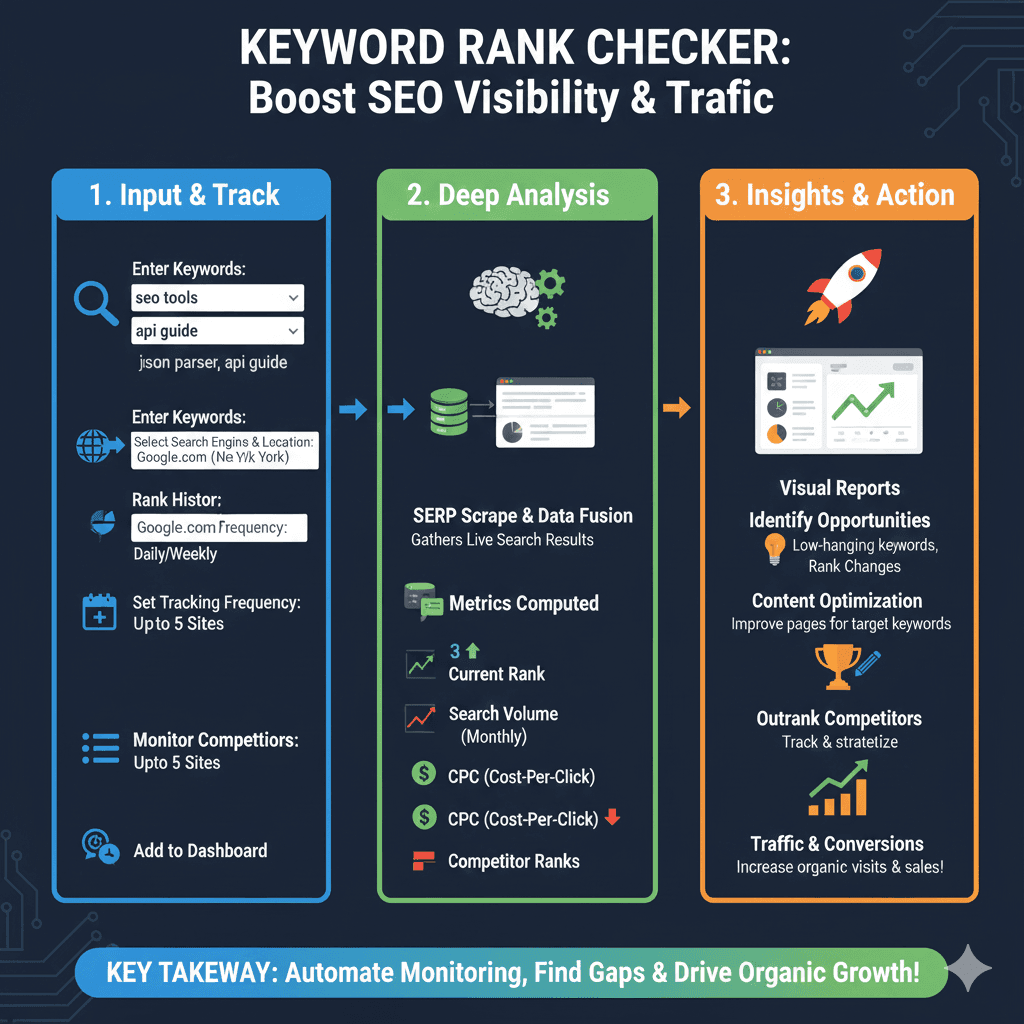
Keyword Rank Checker Workflow
The process is divided into three main stages:
1. Input & Track (Blue)
- Enter Keywords: Input specific terms like “seo tools” or “api guide”.
- Select Parameters: Choose the search engine and location.
- Set Frequency: Establish how often tracking occurs, such as daily or weekly.
- Monitor Competitors: Add up to 5 competitor sites to track alongside your own.
2. Deep Analysis (Green)
- SERP Scrape & Data Fusion: Gather live search results from SERPs.
- Metrics Computed:
- Current Rank: Your position in search results.
- Search Volume: Monthly interest for the keyword.
- CPC (Cost-Per-Click): The estimated value of the traffic.
- Competitor Ranks: How rival sites are performing for the same terms.
3. Insights & Action (Orange)
- Identify Opportunities: Find low-hanging keywords and monitor rank changes.
- Content Optimization: Improve pages for specific target keywords.
- Outrank Competitors: Track and strategize to move ahead of rivals.
- Traffic & Conversions: Increase organic visits and sales.
Related Articles from Our Network
- BeautifulSoup JSON Parser-Combining BeautifulSoup and JSON for Web Scraping(json parser)
- What Is Okta JWT? (Beginner-Friendly Explanation)(json web token)
- What Is JSON Fake API? (Beginner-Friendly Explanation)(fake json)
- Diff JSON Online- The Ultimate Guide to Comparing JSON Files for Developers(compare json)